
Choosing an industrial panel PC touchscreen is not simply a contest between capacitive and resistive technology. The correct choice depends on what touches the screen, what may collect on its surface, and what the operator must do with the HMI.

A resistive touch panel PC is usually the lower-risk option when operators wear thick or changing gloves, use a non-conductive stylus, and perform simple single-point actions. A capacitive touch panel PC is often a stronger choice when the HMI needs light-touch input, clear glass, or multi-touch gestures.
Industrial PCAP controllers can support glove tracking and water tolerance. For example, Microchip documents multi-gloved-finger tracking and reliable finger tracking through water droplets in selected controller designs. This proves that glove-compatible and water-tolerant PCAP is technically possible, but it does not prove that every capacitive industrial panel PC includes those capabilities. Microchip maXTouch documentation
The practical rule is therefore simple: select the industrial panel PC touchscreen from the real operating condition, and then verify the exact product configuration. Do not decide from the words “capacitive,” “resistive,” or “front IP65” alone.
Can Operators Use an Industrial Panel PC While Wearing Gloves?
For an industrial panel PC project, “operators wear gloves” is not enough information. You need to know the glove material, thickness, dry or wet condition, and whether the glove type may change between shifts or seasons.
Thin nitrile gloves, latex gloves, ordinary work gloves, thick rubber gloves, leather safety gloves, and insulated winter gloves do not create the same touchscreen condition. Two industrial panel PCs both described as “capacitive touch” may perform differently with the same glove.
When Resistive Touch Reduces Glove Compatibility Risk
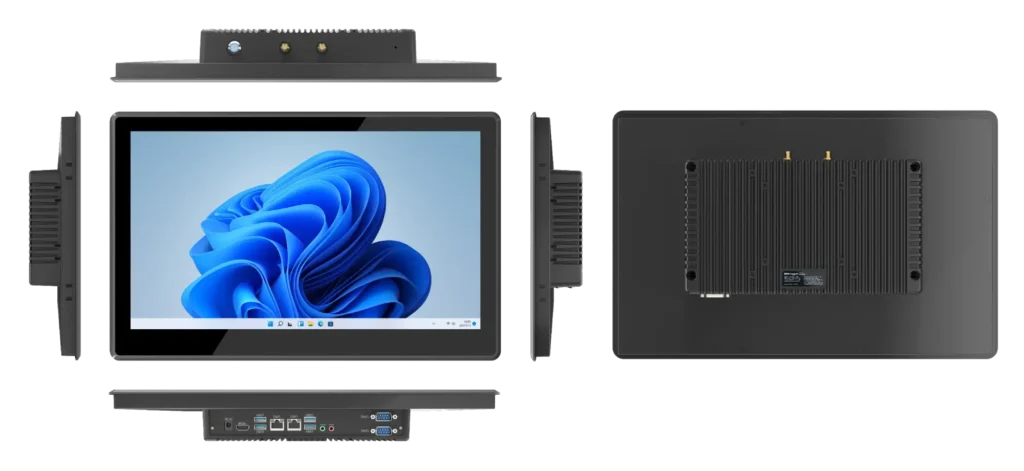
A resistive industrial panel PC detects input when pressure brings conductive layers into contact. Because the input comes from pressure rather than the electrical properties of a bare finger, operators can normally use a glove, finger, plastic stylus, or another suitable blunt object.
Analog Devices identifies gloves and stylus input as practical use cases for resistive touchscreens. DMC also confirms that its resistive screens respond to gloves and that common four-wire and five-wire resistive versions are single-touch. Analog Devices resistive-touch explanation and DMC touchscreen FAQ
A five-wire resistive touchscreen is therefore a strong candidate when an industrial panel PC must be operated through thick, non-conductive, or frequently changing PPE. It also fits HMI tasks based on large buttons, numeric input, recipe selection, Start/Stop commands, and alarm acknowledgment.
This does not make resistive touch universally better. The operator must still apply enough pressure, and the HMI targets must be large enough for reliable operation with the actual gloves.
When an Industrial PCAP Screen May Still Work with Gloves
“Capacitive means bare fingers only” is no longer an accurate rule. Industrial projected capacitive touch, or PCAP, can be designed for gloved operation.
Actual performance depends on glove material and thickness, controller sensitivity, firmware tuning, cover-glass thickness, electrical noise, and the complete touchscreen stack. A supplier statement such as “supports gloves” is incomplete unless it identifies the tested glove, controller mode, cover glass, and operating conditions.
If a project needs the lighter touch or multi-touch experience of a capacitive touch panel PC, test the exact industrial panel PC with the gloves operators will actually wear. Do not transfer a controller manufacturer’s capability claim to an unverified panel PC configuration.
What Happens When an Industrial Panel PC Screen Is Wet?
“Water exposure” is not one operating condition. An industrial panel PC may face a damp finger, an occasional splash, droplets resting on the screen, condensation, a continuous water film, cleaning liquid, coolant, or a full washdown process.
These conditions affect touchscreen selection differently. An industrial panel PC that recognizes a wet finger may still produce false inputs when several droplets remain on the glass. A touchscreen that rejects droplets may still be installed in an enclosure that is unsuitable for washdown.
Why Water Can Affect a PCAP Industrial Panel PC
A PCAP touchscreen detects changes in an electrical field. Water and other conductive liquids can alter the signal received by the touch controller.
Depending on the controller and its tuning, a capacitive industrial panel PC may produce ghost touches, miss the intended touch, or struggle to distinguish a finger from a droplet.
Selected industrial PCAP systems address these problems through water-rejection algorithms, signal filtering, multiple sensing methods, and controller tuning. The important distinction is between an industry-level capability and a product-level capability: PCAP can support wet operation, but a particular industrial panel PC must still be configured and validated for it.
Why Resistive Touch Can Be More Predictable Around Surface Water
Water droplets do not normally create the deliberate physical pressure needed to activate a resistive touchscreen. This can make a resistive industrial panel PC less vulnerable to electrically induced false touches from surface water.
However, resistive touch is not automatically waterproof. Water can still challenge the bezel seal, damaged membrane, cable entry, enclosure, or cleaning process. The industrial panel PC must still be checked for ingress protection, surface durability, and chemical compatibility.
Front IP65 Does Not Prove Wet-Touch Operation
An IP rating and wet-touch performance answer different questions:
- An IP rating concerns protection against the ingress of solids and water at the rated enclosure or surface.
- Wet-touch performance concerns whether the touchscreen controller recognizes the intended input while water is present.
IEC 60529 defines the IP Code as protection provided by enclosures. It does not certify touchscreen accuracy, glove compatibility, water rejection, or chemical resistance.
If an industrial panel PC specification states “front IP65,” treat it as a front-panel protection claim unless the manufacturer confirms a broader scope. It should not be expanded into proof of whole-enclosure protection, high-pressure washdown suitability, or reliable operation with standing water on the screen.
How Do Dirt, Oil and Industrial Residue Change the Touchscreen Choice?
“Dirty factory” is too broad to select an industrial panel PC touchscreen. The buyer must identify what actually reaches the screen.
Dry dust, metal particles, oil, grease, water-based coolant, wet food residue, condensation, and cleaning chemicals should not be treated as one type of dirt. They affect touch recognition, surface control, sealing, and cleaning in different ways.
Separate Dry Dust, Conductive Liquids and Oil Films
Dry, non-conductive dust does not normally imitate a finger on an industrial PCAP screen or create the deliberate pressure required by a resistive screen. However, accumulated dust may hide HMI information, while hard particles trapped in a glove can scratch the touchscreen during repeated operation or cleaning.
Water-based coolant, wet residue, and conductive cleaning fluids may interfere with capacitive sensing. The result depends on the liquid, concentration, film thickness, touch controller, and tuning of the industrial panel PC.
Oil and grease create a different problem. They may form a film that affects visibility, finger or glove movement, surface control, and cleaning requirements. Oil should not be grouped with conductive liquids under one electrical explanation.
A resistive industrial panel PC may continue to accept pressure input through some surface contamination, but that does not prove that its membrane, seal, or coating is compatible with the contaminant.
Verify Three Separate Industrial Panel PC Requirements
For a dirty or wet environment, verify three different requirements:
- Can the industrial panel PC touchscreen recognize the intended input?
- Can the rated part of the panel PC prevent the contaminant from entering?
- Can the touchscreen surface tolerate the required cleaning method and chemical?
A front-panel IP rating cannot answer all three questions. Choosing resistive touch also does not automatically authorize aggressive solvents, high-pressure cleaning, or washdown use.
In food processing, for example, an operator may wear rubber gloves while water and food residue reach the screen. Resistive touch may reduce glove uncertainty, while a properly engineered PCAP configuration may provide lighter operation. The final industrial panel PC choice still depends on the actual glove, liquid, cleaning process, enclosure rating, and tested touch behavior.
If Both Touch Options Can Work, What Should Decide the Industrial Panel PC Touchscreen?
When gloves, water, and contamination do not exclude either touchscreen, choose the industrial panel PC configuration from the real HMI workflow.
Choose PCAP When Multi-Touch Solves a Real HMI Task
A capacitive touch panel PC is a strong candidate when the application genuinely uses:
- Pinch-to-zoom for drawings, maps, or inspection images
- Swipe navigation between HMI screens
- Multi-finger input
- Light, frequent touch operation
- Image inspection or map navigation
- Complex graphical dashboards
The purchasing question is not whether the industrial panel PC has ten-point multi-touch. It is whether the HMI software uses those interactions and whether they work with the required gloves, water, and surface contamination.
If the HMI only contains large buttons and numeric entry, multi-touch may add little operational value.
Choose Resistive When Predictable Pressure Input Matters More
A resistive touch panel PC remains practical when the industrial HMI uses single-point commands, non-conductive stylus input, deliberate button presses, or thick work gloves.
This is not an outdated choice. It is a conditional industrial panel PC decision in which predictable pressure input solves the operator’s real problem better than gesture control.
Use Display Quality Only as a Tie Breaker
A PCAP industrial panel PC normally provides a glass surface and lighter touch response. A resistive touchscreen requires deliberate pressure and includes additional flexible layers.
Use these differences only after glove, water, dirt, and HMI requirements have been satisfied. A clearer screen cannot compensate for unreliable glove operation, while easy glove operation cannot replace validated multi-touch when the HMI truly requires it.
Industrial Panel PC Touchscreen Selection Matrix
“Verify” in this matrix means testing the exact industrial panel PC configuration, not relying on the general technology name.
| Actual operating condition | Industrial PCAP | Resistive touch | Purchasing direction |
| Bare fingers in a clean indoor machine | Strong candidate | Can work | PCAP usually offers the more natural interface |
| Thin nitrile or latex gloves | Product-specific | Strong candidate | Either may work; test the actual gloves |
| Thick or changing work gloves | Higher uncertainty | Strong candidate | Resistive normally requires fewer glove assumptions |
| Non-conductive stylus or arbitrary blunt input | Product dependent | Strong candidate | Usually favors resistive touch |
| Wet finger | Verify controller behavior | Pressure input may remain predictable | Do not decide from touch type alone |
| Water droplets or a water film on the screen | Verify water rejection | Candidate, but sealing still matters | Test false-touch and missed-touch behavior |
| Dry dust or hard particles | Depends on accumulation and cleaning | Candidate | Define the contaminant and cleaning process |
| Water-based coolant or conductive cleaner | Product-specific validation | Candidate | Test touch behavior, sealing, and chemical compatibility |
| Oil or grease film | Test visibility, movement, and cleaning | Test membrane and cleaning compatibility | Do not treat oil as the same mechanism as water |
| Multi-touch gestures required | Strong candidate | Common five-wire resistive is normally single-touch | Usually favors PCAP |
| Simple single-point HMI | Works | Works | Let gloves, water, stylus, and contamination decide |
This comparison produces three valid outcomes:
- Prefer resistive touch: Thick or unpredictable gloves, non-conductive stylus input, and simple single-point commands make pressure input the lower-risk option.
- Prefer PCAP: Light-touch or multi-touch operation creates real workflow value, and the actual glove and moisture conditions have been validated.
- Verify before choosing: Both technologies may work, but the available specifications do not prove compatibility with the real operating condition.
A sample test can reduce the risk of discovering after installation that gloves, cleaning liquids, water films, or HMI target sizes change the operator experience.
Verify the Exact Industrial Panel PC Configuration Before Ordering
“Capacitive” and “resistive” are technology categories, not complete operating guarantees. Before ordering an industrial touch panel PC, ask the manufacturer to confirm:
- Exact touchscreen technology and controller
- Whether the resistive option is five-wire and single-touch
- Whether glove operation has been tested
- Validated glove materials and thicknesses
- Whether PCAP glove mode needs a specific firmware setting
- Whether water rejection or wet-touch operation is supported
- Cover-glass construction and thickness
- Whether the IP rating applies to the front panel or the complete enclosure
- Installation conditions required for the stated protection rating
- Approved cleaning agents and cleaning methods
- Whether multi-touch, dragging, edge input, and small HMI targets work under the real conditions
Test the Real Operator Condition
Test a sample industrial panel PC with:
- The actual dry and wet gloves
- A wet finger
- Water droplets left on the screen
- The actual oil, coolant, dust, or residue where safe
- Normal and repeated tapping
- Dragging and screen-edge operation
- The smallest HMI target operators must use
- The required stylus
- Cleaning followed by immediate operation
- Checks for ghost touches, missed touches, delayed input, and unintended commands
The purpose is not to prove that the touchscreen works on a clean desk. It is to prove that the exact industrial panel PC works under the interaction conditions that matter to the project.
How SINSMART Touchscreen Options Fit This Decision
The current SINSMART industrial panel PC category lists resistive and capacitive touchscreen options. Selected 8-inch, 12-inch, and 15-inch industrial panel PC pages list configurations with ten-point capacitive touch and optional five-wire resistive touch. SINSMART also lists front-panel protection separately in its IP65 panel PC category.
These pages prove that different touchscreen and front-protection configurations are available. They do not prove that every SINSMART PCAP model works with every glove or remains accurate with water on the screen.
To confirm a configuration, provide the glove material and thickness, water exposure, contaminants, cleaning method, stylus requirement, HMI target size, and multi-touch requirement.
FAQ About Industrial Panel PC Touchscreens
Can a Capacitive Industrial Panel PC Work with Nitrile or Latex Gloves?
It may. Thin nitrile or latex gloves can work with some industrial PCAP configurations, but compatibility depends on the controller, sensitivity, cover glass, glove thickness, and glove condition. Test the exact industrial panel PC before ordering.
Will a Resistive Industrial Panel PC Work with Thick Work Gloves?
A pressure-based resistive touchscreen normally depends less on glove conductivity, so it is a strong candidate for thick work gloves. The industrial panel PC should still be tested for required pressure, HMI target size, and operator accuracy.
Does IP65 Mean an Industrial Panel PC Can Be Used with a Wet Screen?
No. IP65 describes ingress protection for the rated enclosure or surface. It does not prove wet-touch accuracy, water rejection, or correct operation while droplets remain on the industrial panel PC screen.
Can Water Droplets Cause False Touches on a Capacitive Industrial Panel PC?
Yes. Some PCAP configurations may produce false or missed touches when water changes the sensed electrical field. Other industrial PCAP controllers provide water rejection, so the exact panel PC configuration must be checked.
Is Resistive Touch Always Better for a Dirty Factory?
No. “Dirty” may mean dry dust, metal particles, oil, water-based coolant, food residue, or cleaning fluid. The correct industrial panel PC touchscreen depends on how the contaminant affects input, sealing, surface movement, and cleaning.
Does an Industrial Panel PC Need Multi-Touch?
Only when the HMI workflow uses functions such as pinch-to-zoom, swipe, or multi-finger input. For Start/Stop commands, numeric entry, and alarm acknowledgment, a single-touch resistive industrial panel PC may be sufficient.
Is a Five-Wire Resistive Touchscreen Automatically Waterproof?
No. Five-wire describes the resistive sensor architecture. It supports pressure-based glove and stylus operation, but it does not prove enclosure sealing, washdown suitability, or chemical compatibility.
What Information Should I Send the Industrial Panel PC Manufacturer?
Send the glove material and thickness, dry or wet use, expected water exposure, screen contaminants, cleaning process, required stylus, HMI target sizes, multi-touch needs, and installation environment. This allows the manufacturer to verify a configuration instead of guessing from a touchscreen label.
Conclusion: Choose the Industrial Panel PC Touchscreen by the Real Interaction Condition
Choose resistive touch when thick or changing gloves, non-conductive stylus input, and predictable single-point pressure are the main industrial panel PC requirements.
Choose industrial PCAP when light touch or multi-touch creates real workflow value and the exact glove, water, and contamination conditions have been validated.
Do not treat front IP65 as proof of wet-touch operation. Do not treat “capacitive” as proof of glove compatibility. Do not treat “resistive” as proof of complete waterproofing or chemical resistance.
The final question is not simply “capacitive or resistive?” It is: Has this exact industrial panel PC touchscreen configuration been tested with the operator, glove, water, dirt, and HMI task that the project will actually use?